Real-time Bible verse display

The pastor speaks. The verse appears.

ICHOS listens to your service through any microphone, recognises Bible references and song titles instantly, and prepares verses, hymn lyrics, and slides on screen — all running entirely on your computer by default, with no internet required and no typing during the sermon itself. Your operator confirms each detection with one tap, or flips on Auto-Display and ICHOS handles the rest.

Built for churches everywhere · Works fully offline · Mac & Windows

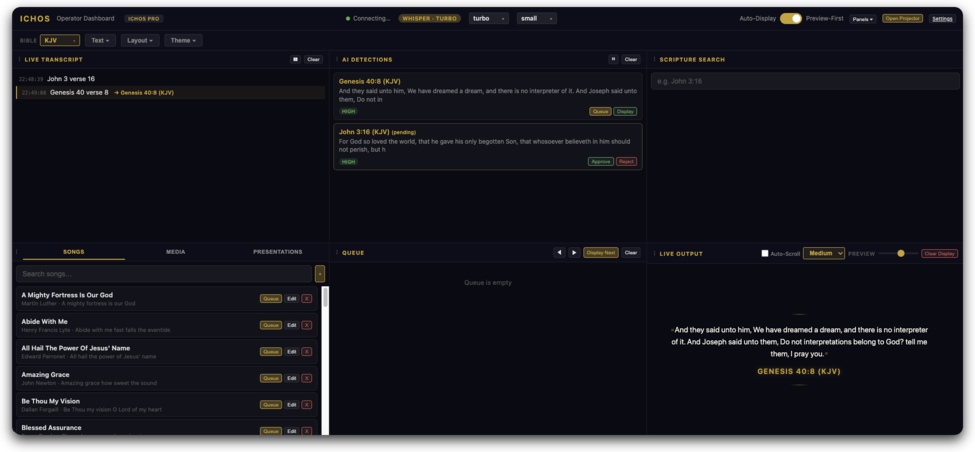
Operator Dashboard ICHOS operator dashboard showing live transcript, AI verse detections, and song library
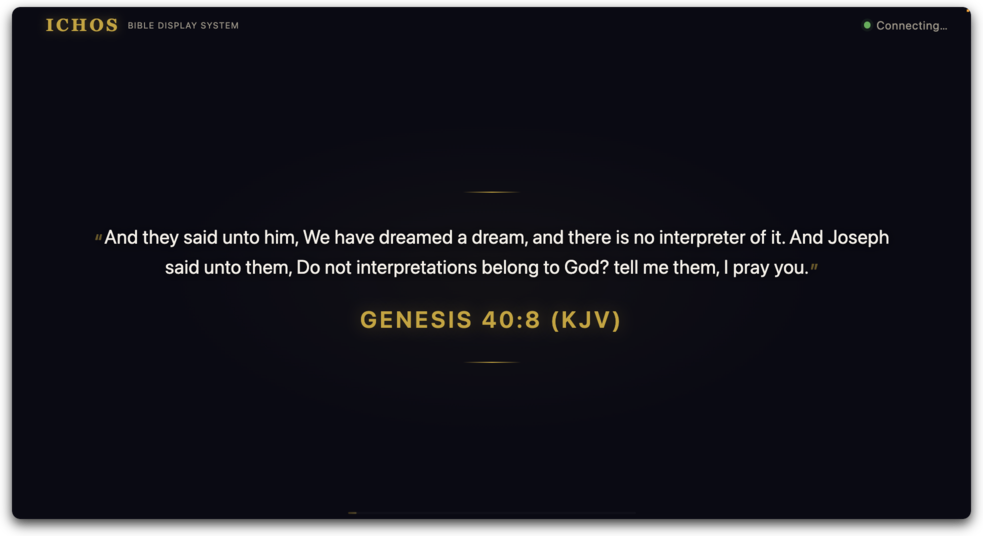
Projector Display ICHOS projector display showing Bible verse with gold reference text
Offline-first · no cloud dependency
12 Bible translations · EN / FR / ES
Built for churches everywhere
Windows & Mac (Apple Silicon)
Three steps

No typing. One tap. Just preach.

ICHOS replaces the typing — the slow, error-prone part. Your operator sees each detected verse the moment the pastor speaks it and confirms with a single tap. Or flip on Auto-Display and verses go live the instant they're detected.

1

Plug in a microphone

Use the existing mic from your soundboard, a USB headset, or anything connected to the computer.

2

Run ICHOS

Double-click the app. Open your browser to localhost. Drag the page onto the projector and go fullscreen.

3

Preach normally

"Turn with me to Romans 8:28" — ICHOS detects the reference in under 2 seconds, the operator taps confirm, the verse goes live. (Or flip on Auto-Display and skip the tap entirely.)

Under the hood

Audio in. Verse out. Two seconds.

Three things happen in sequence. The whole pipeline runs on your computer — no cloud round-trip, no internet dependency.

1 Pastor speaks
live demo · no mic access
2 ICHOS recognises
"Turn with me to John, chapter three, verse sixteen…" |
on-device, ~0.5 s
3 Verse appears
John 3:16
For God so loved the world…
on screen, <2 s end-to-end
What's included

Everything a Worship Service Needs.

Designed by a church-attending product team for the realities of live worship: power cuts, no Wi-Fi, second-hand projectors, and pastors who preach from memory.

Six speech engines, your pick

Two built-in (standard + enhanced) for the no-internet promise, four cloud (Deepgram, AssemblyAI, Azure, Google) when you want maximum accuracy. Bring your own API keys — no vendor lock-in. Pick the language and region that fits your church.

Verses, hymns, and media

12 Bible translations bundled (10 English: KJV, NKJV, NIV, ESV, NLT, AMP, CEB, GNT, MSG, NET; plus French NBS and Spanish RV1960), plus a hymn-lyrics library and media-image library — all on the same projector flow.

Multi-verse stacking

When a sermon hops between Romans 8 and Psalm 23 in the same minute, the screen stacks both verses side-by-side until the topic moves on.

Works in any venue

Auto-detects your projector resolution and scales the layout to whatever aspect ratio you have — no clipped text, even on non-fullscreen displays. Stadium-bright theme for sunlit sanctuaries, one-click. The operator gets a height slider + screen-size picker when auto-detect needs a nudge.

Offline by default

Out of the box, ICHOS never touches the internet — speech-to-text, verse lookup, and the projector flow are all local. Cloud STT engines are opt-in only. Your Sunday is never at the mercy of someone else's outage.

USB-portable

Copy the app to a USB stick, plug it into any laptop, double-click. Useful for guest preachers, mid-week meetings, and church-plants with no dedicated machine.

Service plan & verse queue

Paste your sermon outline ahead of time — references one per line — and ICHOS queues them in order. Click Display Next through the service or let the live detection match the pastor as they preach. Verse history keeps the last 10 displayed verses one click away when someone wants a passage back.

Multi-screen ready

Drives any number of displays from one ICHOS instance over WebSocket — main projector in the sanctuary, confidence monitor in the green room, livestream feed (Pro tier). Each display can use a different profile (full stage, compact monitor, minimal confidence view) so each screen shows the right amount of detail.

Custom branding

Upload your church's own background image, pick a color palette, drop a clock overlay in the corner that auto-hides when a verse appears. Font family, size, weight, and alignment all adjustable from the operator console — no rebuild, no restart, changes show up on every connected screen instantly.

Customizable operator layout

The operator console is a panel grid you can rearrange — drag the transcript, detections, song library, queue, or live preview to wherever your eye lands fastest. Hide the panels you don't use. ICHOS remembers your layout per machine, so the AV booth setup and the green-room laptop can have completely different layouts.

Pause for prayer or interruptions

When the pastor pauses for prayer, a baby cries near the mic, or a song breaks out, hit pause and ICHOS stops listening. Resume with one tap. Detection stays clean — no false hits on irrelevant audio, no surprises on the projector mid-prayer.

See what the model heard

Live transcript and AI-detection feeds sit right in the operator console alongside the queue. You can tell at a glance when the model is confused, when accents are tripping the recognition, or when the mic's picking up too much room noise — and respond before a wrong verse reaches the screen.

John 3:16
For God so loved the world…
Default Dark
John 3:16
For God so loved the world…
Stadium Bright

Switch between themes from the on-screen settings panel — same verses, different rendering, no restart.

Three plans, no surprises

£10 / month Lite. £20 / month Standard. £35 / month Pro.

Lite is £10/month — verse detection on one display with KJV, no watermark. Standard adds the full Bible library, songs, multi-screen, themes. Pro layers on cloud STT, livestream output, and unlimited multi-site. Two months free on every annual plan.

See pricing details
Common questions

Before you ask…

Does it really work without the internet?

Yes. The speech recognition, the verse lookup, and the display all run locally on your computer. You only need internet to download ICHOS the first time and to renew your subscription. The Sunday-service experience is fully offline.

Will it understand my accent?

The built-in speech engine handles most English accents out of the box, and we publish empirical word-error-rate numbers on a held-out accent corpus so you can verify before you buy. If your church's accent or language pushes the offline engine past comfort, switch to one of the four cloud engines and pick your locale from the admin panel — every major English variant plus French, Spanish, Portuguese, German, and 100+ more locales are supported by the cloud providers.

Can I use my own speech-to-text provider?

Yes. ICHOS supports six engines: ICHOS offline (default), ICHOS enhanced offline, plus four cloud options (Deepgram, AssemblyAI, Azure, Google). Pick from the admin panel, paste your API key — done. We don't mark up vendor pricing; you pay them directly. Switch back to offline any week the church Wi-Fi has been flaky.

Does it do hymns and slides too, or just Bible verses?

Both. ICHOS has a hymn-lyrics library and a media-image library in the operator console — both display on the same projector. The verse-detection part is the headline use case but it's not the only thing the screen can show.

Can I add my own songs and hymns?

Yes. Open the operator console's Songs tab, click the + button, and fill in the title (required), author (optional), and the lyrics. Verses or stanzas are separated by blank lines so the projector can show one section at a time. Save and the song stays in the library — no per-song download, no song-account log-in. Search by title from the same tab to bring it back next service. There's no song-count limit on a Standard subscription.

What about images, photos, announcement slides?

Upload them through the operator console's Media tab — any standard image format works (JPEG, PNG, WebP). Click the entry to push it to the projector. Useful for: announcement slides, baptism photos, sermon-series cover art, missionary photos, anything visual you'd otherwise need a separate slide app for. Everything stays on your computer; no upload to the cloud.

What kind of computer do I need?

Any reasonably modern Mac or Windows machine with a microphone input. We'll publish exact specs with the public release; in practice, anything from the last five years handles ICHOS comfortably. The projector is a separate display — ICHOS doesn't care what model it is.

What does the Auto-Display toggle do?

A switch in the operator console that picks how detected verses reach the projector. Off (the default): ICHOS detects each reference and offers it to the operator — one tap and it goes live. Safer for high-stakes services because nothing reaches the projector unconfirmed. On: verses go live the instant they're detected, no operator action. Good for trusted small services or once the model has earned your confidence. You can flip it mid-service if needed.

Can the operator still pick verses by hand?

Yes. There's a search box in the admin panel for typing references the old-fashioned way, a service-plan editor for queueing up a whole sermon outline in advance, and a verse-history list for pulling back something the pastor already passed. Detection-based input is on by default, but the manual paths are always available.

What about wrong verses appearing on the projector?

When the model is unsure between two references it sounds like, it shows both as candidates and waits for the operator to pick — instead of guessing wrong on the screen. With Auto-Display off (the default), every detection is reviewed before it goes live, so a misrecognition stays off the projector entirely.

Get started

Free for 30 days.

No card on file. No "trial features missing." Full ICHOS, full month, see if it's right for your church.

Windows & Mac (Apple Silicon) · Lite starts at £10/month